Your details are the engine fuel. The better the inputs, the more meaningful the output.
This section is where you tell the planner about you — your age, your retirement date, your accounts, your income sources. Take your time here. A rough number is fine where precision isn't possible, but a careless one will skew everything downstream.
The tabs you see reflect the choices you made in Plan Settings. If a tab is missing, go back to Plan Settings and check the relevant box. Equally, if a tab is visible but no longer relevant, uncheck it — but be aware that any figures already entered in a hidden tab remain active in the projection. Always do a quick sanity check before running.
Basic details
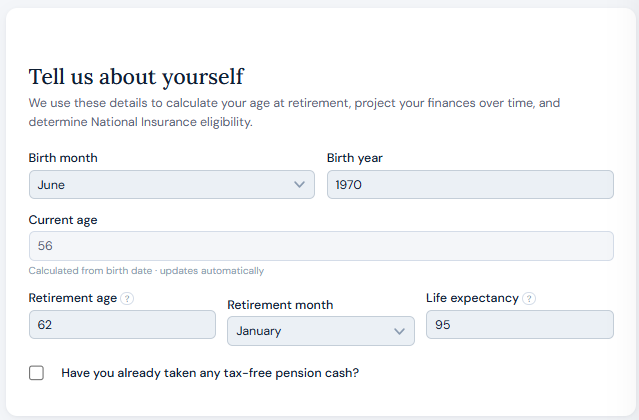
Enter your birth month and year. No day is required — the planner limits the personal data it needs to function, and a 30-day variance over a 30-year horizon is negligible compared to the other variables at play.
Retirement age
This is a key input. Income drawdown begins at the age you specify here, and you can be granular to the month if you have a specific date in mind.
Life expectancy
Life expectancy determines how far the projection runs. For a single user, account balances at that point are shown — indicative of what might be passed on.
For couples, when the first user reaches their life expectancy the planner transfers assets to the surviving partner. Savings and ISAs move across and continue to grow and be drawn as normal. DC pensions create a specific inherited pot which behaves differently depending on the age at death:
The inherited DC pot is drawn after guaranteed income but before ISAs, savings, and non-inherited personal DC pensions.
Tax-free pension cash already taken
If you have already taken tax-free pension cash, enter that here. The planner needs to know how much of your Lump Sum Allowance has already been used. Too much or too little will directly affect the accuracy of your projection.
State pension
If you've checked the State Pension box, the planner defaults to age 67 and the current full new State Pension amount. Both can be adjusted.
Check your actual State Pension forecast at gov.uk — a link is provided within the planner. If you have gaps in your National Insurance record your forecast may be lower than the maximum, and it is worth entering your actual figure.
DB pension
Defined benefit pensions are one of the more complex areas of the planner. A dedicated guide covers this in full.
DC pension
Defined contribution pensions — workplace and personal — are where most people hold the bulk of their retirement savings. A dedicated guide covers this in full.
Savings, Cash ISA & Stocks and Shares ISA
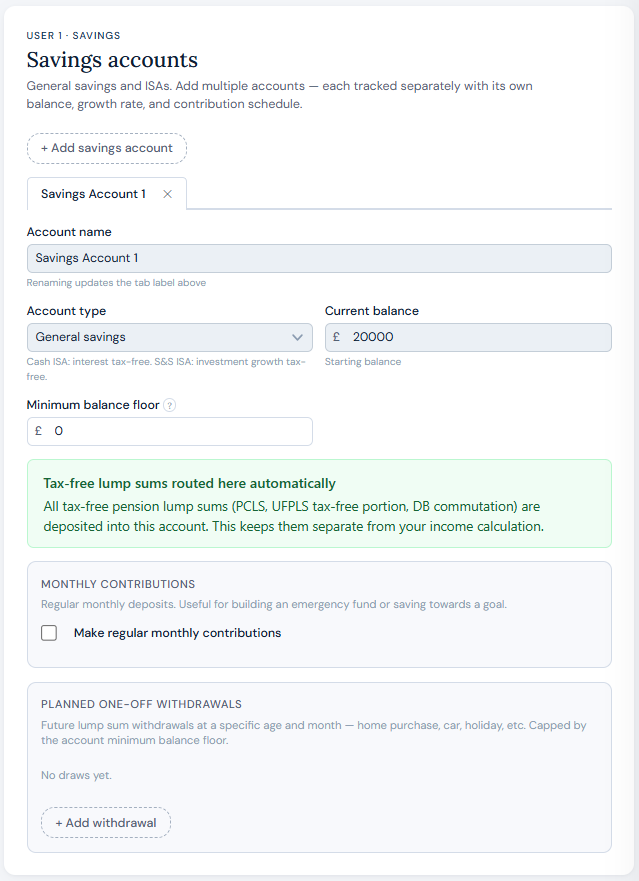
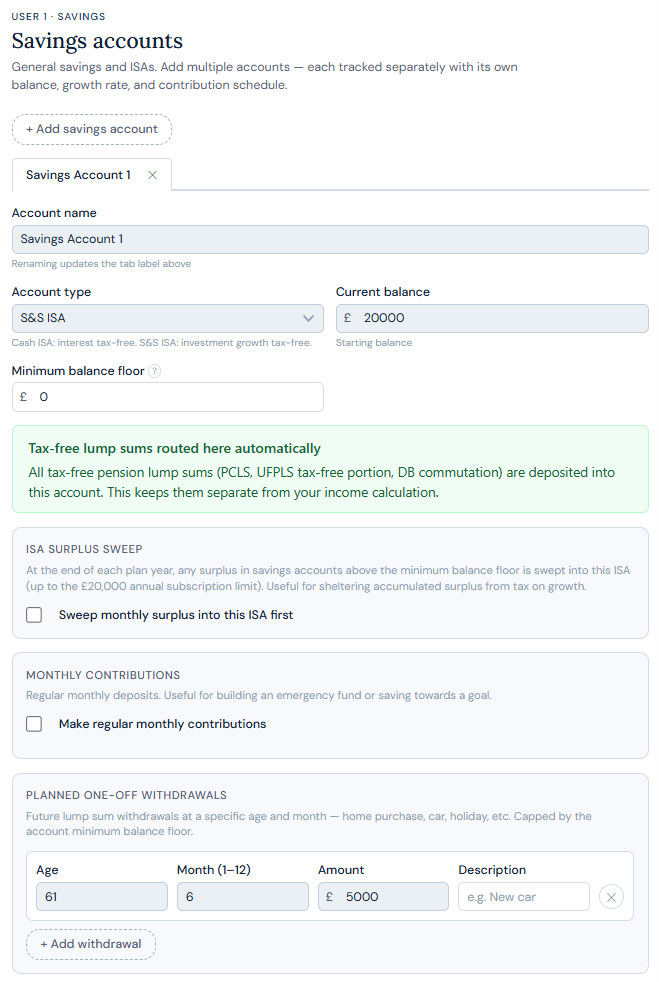
All three account types follow the same pattern. Click Add account, give it a unique name, and select the account type. Getting the type right matters — a £200,000 ISA and a £200,000 savings account are treated completely differently for tax purposes.
Growth rates
Growth rates are set centrally in Plan Settings rather than per account. If you have multiple accounts of the same type, use a weighted average across them. Guide 1 covers this in more detail.
Current balance
Enter your current balance. If you're decades from retirement and actively using the account, a best estimate of its future value is fine — the planner is a guide, not a guarantee.
Ongoing contributions
If you're actively saving into this account you can enter the monthly amount and the age range over which contributions apply.
ISA sweeps
If you hold a Cash or Stocks and Shares ISA, the planner can automatically sweep money from a linked savings account annually to maximise your tax-efficient wrapper. You can set a floor on the savings account below which the sweep will not go — useful if you want to preserve an emergency fund.
Account floor
All accounts support a minimum balance floor. The planner will never draw below this amount to fund your income. If you need to access that money regardless, a one-off withdrawal overrides it.
One-off withdrawals
All accounts support a single lump sum withdrawal at a date you specify. Tax-free pension cash, for example, is paid into your savings account — if you plan to spend it, set that up here.
If a tab is visible but the account is not relevant, uncheck it in Plan Settings. Any figures in a hidden tab remain active in the projection — a stale non-zero balance in a hidden account will silently affect your results.
Annuities
Annuities have their own dedicated guide covering guaranteed income, fixed-rate and CPI escalation, fixed terms, and survivor benefits.
Work income
This section is for income earned after your retirement date — typically part-time or consultancy work. It is not intended for pre-retirement income.
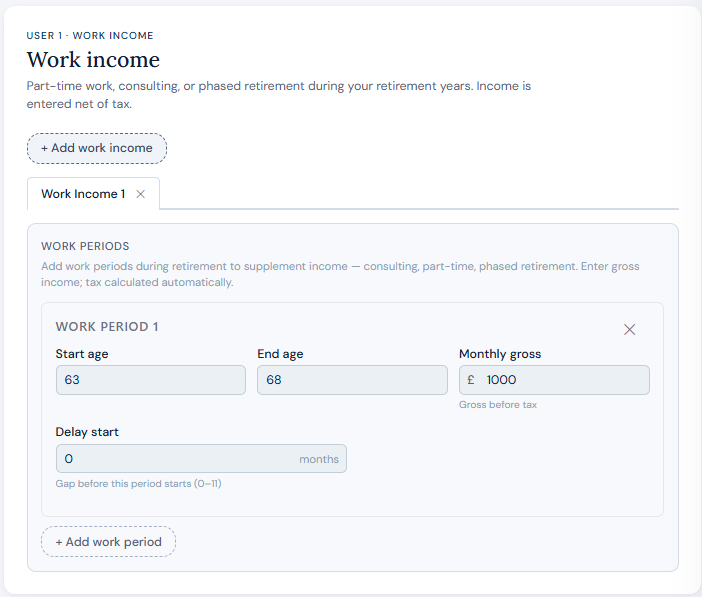
Set a start age, an optional delay from retirement (for example, retire at 62 but start part-time work six months later), an end age, and a monthly pre-tax amount. You can create multiple periods. All work income is treated as PAYE.
Windfalls
For one-off receipts — inheritance, insurance payouts, property proceeds. Enter the amount and when you expect to receive it.
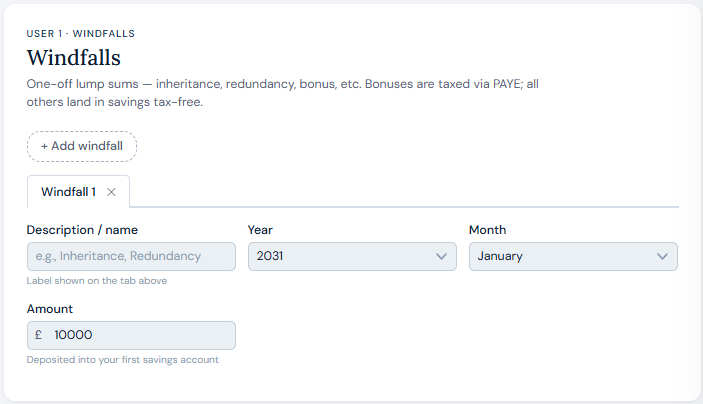
All windfall amounts land in your savings account, from where they can be distributed further including via ISA sweeps.
GIA & property
These are more complex areas with dedicated guides coming shortly.
A final check
With your details entered, take a moment to review each tab. Check the numbers look right, confirm hidden tabs aren't carrying stale figures, and make sure your retirement age is set correctly.
A clean inputs section means a projection you can actually trust.