Your defined contribution pension is likely your largest retirement asset. Getting this section right matters more than any other.
A defined contribution pension is one where you — and usually your employer — pay money in, it gets invested, and the pot grows over time. What you end up with depends on how much goes in, how long it's invested, and how markets perform. Unlike a defined benefit pension there is no guaranteed income — you build the pot, then decide how to draw from it.
This section of the planner is where you tell the planner what you have and how you intend to access it.
Pension Settings
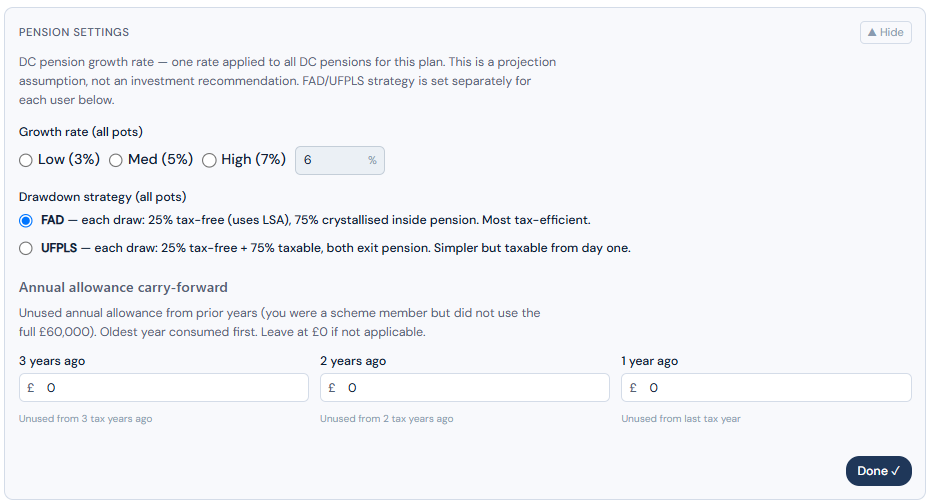
Before adding individual pension pots, complete the Pension Settings section first. This establishes the rules that apply across all your DC pensions. Once done, select Done to collapse the section and move on to entering your individual pots.
A single growth rate — and why
The planner uses one growth rate for DC pensions, shared across both users in couple mode. This is a deliberate design choice worth explaining.
To model different growth rates for different pots — or different withdrawal strategies across two people — the planner would need to determine an optimal drawdown order across multiple individuals and multiple pots. That is not straightforward, and more importantly, it begins to drift into advice territory. Deciding which pot to draw from first, at what rate, and in what order across a couple's combined assets is precisely the kind of question a financial adviser earns their fee answering.
This planner's purpose is to answer one question: will we have enough? It is not a withdrawal strategy optimiser and it makes no claim to be. For that, seek professional advice.
Use a weighted average growth rate across all your DC pensions. If you have two pots — one growing at 6% and one at 4%, weighted by value — use the blended rate that reflects your overall DC portfolio.
FAD or UFPLS — your choice
One setting that does remain individual is how you take income from your DC pension. There are two approaches and each person can choose independently:
You take your tax-free cash entitlement first (or in stages), and then draw the remainder as taxable income. The pot stays invested throughout.
Each withdrawal is split automatically: 25% tax-free, 75% taxable. You don't take a separate lump sum — every draw contains both elements.
This is a legitimate individual tax decision and the planner lets each user make their own choice. Try both options and compare the effect on your projection. The difference can be meaningful depending on your income level and tax position.
Annual contribution limits — and carry forward
You can pay up to £60,000 per year into a pension, but no more than your actual earnings in that year. If you don't use your full allowance, the unused balance can be carried forward for up to three years — a genuinely valuable option for those in a position to use it.
Say you earn £65,000 a year and pay £25,000 into your pension, leaving £35,000 of unused allowance to carry forward. The following year you again earn £65,000 and pay in just £20,000, leaving £40,000 unused — added to last year's £35,000, that's £75,000 available to carry forward. In year three, you earn £65,000 basic plus a £70,000 bonus — total earnings of £135,000. You take home £40,000, leaving £95,000 available to contribute. Your carry forward balance of £75,000 plus this year's £60,000 allowance gives you £135,000 of headroom — more than enough to contribute the full £95,000.
For most people this will never apply. But for those with variable income — bonuses, self-employment, a particularly good year — it is a worthwhile benefit to be aware of.
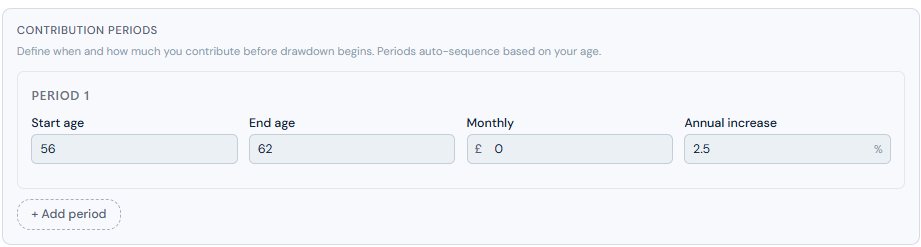
In the planner, enter the monthly contribution amount and the age range over which it applies. If your contributions vary month to month, use a smoothed annual average. Over a multi-decade projection the impact of this approximation is negligible.
Entering your DC pots
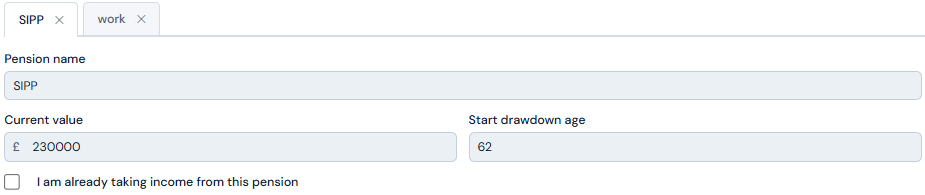
Each pot follows the same pattern. Give it a name, enter the current value, and set the drawdown start age — the age at which the planner begins drawing from this pot to fund your retirement income.
Already drawing from this pension?
Check the relevant box and enter the amount currently in drawdown. This figure should be available on your pension provider's statement or online account.
Actively contributing?
Enter the monthly contribution amount and the age range it applies to. You can create as many contribution periods as you need — for example age 42 to 50 at one rate, then 50 to 57 at another as contributions increase closer to retirement.
Tax-free cash — a more nuanced decision than it first appears
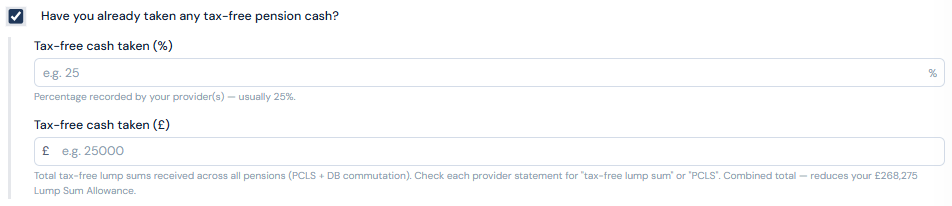
Over your lifetime you can take 25% of your pension savings as tax-free cash, up to a maximum of £268,275. This is your Lump Sum Allowance (LSA). Once it's used, all further pension withdrawals are taxable.
You don't have to take it all at once, and you don't have to take it at retirement. This flexibility is worth thinking about carefully.
The case for waiting
The instinct for many people is to take the maximum tax-free cash as soon as possible. But there is a compelling case for not doing so — or at least for spreading it out.
Consider: if you take 10% of your pot as tax-free cash at retirement and leave the remaining 15% entitlement invested, that 15% continues to grow. If the pot grows from £80,000 to £100,000 in the years following retirement, your remaining 15% tax-free entitlement is now worth 15% of a larger pot. You've extracted more in absolute terms by waiting.
The case for taking none
There is also a case for taking no tax-free cash at all and instead drawing gradually from the pension as taxable income alongside your other income. Depending on your overall income level and tax position, a series of modest taxable pension withdrawals may cost you less in tax than you imagine — particularly in early retirement before state pension and other guaranteed income layers in.
Enter that amount in the LSA section within Basic Details. The planner needs to know your remaining entitlement to model your tax-free cash correctly. An inaccurate figure here will affect the accuracy of every DC projection the planner produces.
What the planner does with it
Once your pension details are complete, the planner applies your DC pensions to the projection in drawdown order — after guaranteed income (state pension, DB pension, work income, annuities) has been applied against your monthly target, and in the sequence you've set in Plan Settings.
The pot grows at your configured rate each year. Tax-free cash is drawn according to your LSA entitlement and timing choices. Remaining withdrawals are run through the tax engine — applying your jurisdiction's income tax bands to determine the net income received.
The result is a month-by-month picture of your DC pension contributing to your retirement income, drawn down in a tax-efficient way within the constraints you've defined.
The planner models what you tell it. It cannot tell you whether your growth rate is realistic, whether your contribution level is sufficient, or whether FAD or UFPLS is the better choice for your specific tax situation. Those are questions a financial adviser can answer with knowledge of your complete picture.
What the planner can tell you — clearly, month by month — is whether what you have is likely to be enough.