A defined benefit pension is one of the most valuable assets you can have in retirement. It's also one of the most misunderstood — and one of the trickiest to enter correctly.
Unlike a defined contribution pension where you build a pot and draw from it, a defined benefit scheme promises you a guaranteed income for life, based on your salary and how long you were a member. What you receive doesn't depend on what markets do.
That makes it valuable. It also makes it complex to model, because every scheme has its own rules, its own retirement age, its own early and late drawing factors, and its own approach to lump sums and survivor benefits.
Currently the DB scheme modelled here is based on the civil service Career Average Revalued Earnings — CARE scheme.
Pension Compass has an ambition to offer more DB scheme options (e.g. final salary schemes) in the future.
The three pension statuses
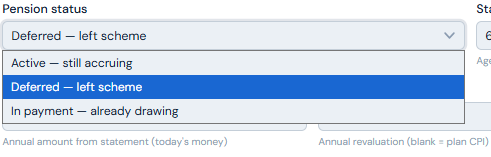
The first and most important choice after naming your pension is its status. This single selection changes everything that follows — the fields you see, the calculations the planner runs, and the figures you need to enter.
You are currently a member of this scheme and your pension is still growing. You're likely still employed by the organisation running the scheme.
You were a member, but you've since left that employer or been moved to a different scheme. Your pension has stopped accruing but you haven't started drawing it yet. This is common for people who've changed jobs, and also for civil servants who were members of the Classic scheme before it closed to new members and were moved across to Alpha — Classic becomes deferred, Alpha remains active.
You are receiving income from this pension now. All the decisions about early or late retirement, lump sums, and accrual are already settled. This is the simplest status to complete.
Try selecting each option and watch how the input fields change. It's a useful way to understand what each status requires before you commit to your entries.
Active pension — still accruing
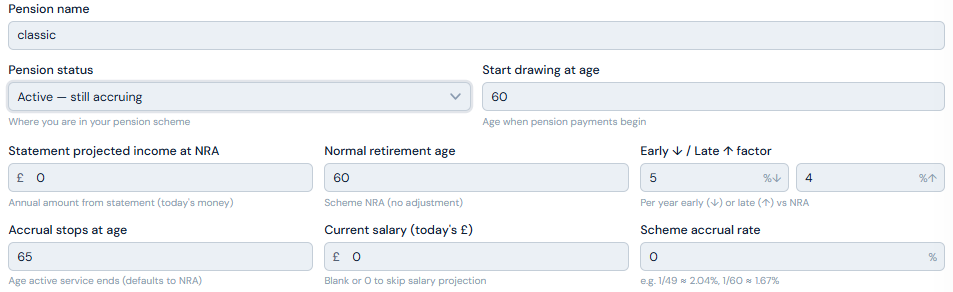
Drawing start age
The age at which you want to begin drawing income from this scheme. This may be your planned retirement age or you may choose to defer drawing from this particular scheme until later. Note that the planner does not allow withdrawals before your retirement date — if you want to draw from this pension earlier you need to set your retirement age accordingly.
Statement projected income at NRA
This figure comes directly from your DB statement. It is the annual income your scheme projects you will receive at your Normal Retirement Age, expressed in today's money.
Most pension statements show a projected figure that already assumes you continue working and accruing right through to your Normal Retirement Age. If you enter this projected figure and also fill in the salary and accrual rate fields below, the planner will count your future service twice and overstate your pension.
The rule is simple: if you leave the salary and accrual rate fields blank, enter the projected-to-NRA figure from your statement. If you fill in the salary and accrual rate fields, you must instead enter your accrued-to-date figure — the benefit you've built up so far, as if your service stopped today. This figure may also appear on your statement, sometimes labelled as your current benefit or transfer value basis.
When in doubt, leave the salary and accrual fields blank and use the projected statement figure. This is the safer and more common approach.
Normal Retirement Age (NRA)
The age at which you can draw your full pension with no reduction or enhancement. It's on your statement. Many older schemes have an NRA of 60 or 65; newer public sector schemes are typically 67 or linked to state pension age.
Early and late drawing factors
Many schemes allow you to draw your pension before or after your NRA, with a corresponding permanent adjustment to your income. Drawing early typically means a reduction applied for each year before NRA. Drawing late earns an enhancement for each year beyond NRA. Your scheme's specific percentages will be on your statement or in its guidance notes.
It is worth understanding how this adjustment works mathematically — because the common shorthand of "5% per year for three years equals 15%" is not quite right. In practice most schemes apply the adjustment on a compound basis, not a simple one:
- 3 years early at 5%/year, simple: 1 − (3 × 0.05) = 0.750 — a 15% reduction
- 3 years early at 5%/year, compound: 0.95 × 0.95 × 0.95 = 0.857 — a 14.26% reduction
- 3 years late at 4%/year, simple: 1 + (3 × 0.04) = 1.120 — a 12% increase
- 3 years late at 4%/year, compound: 1.04 × 1.04 × 1.04 = 1.125 — a 12.49% increase
The compound approach, which most schemes use, is slightly more generous in both directions — a smaller reduction for drawing early, and a slightly larger enhancement for drawing late — compared to the simple arithmetic most people instinctively reach for.
The planner applies a linear approximation internally, which is marginally conservative relative to what your scheme will actually pay. For most users drawing within a year or two of NRA the difference is negligible. For someone drawing five or more years early the gap is worth being aware of — your actual scheme income will be modestly higher than the planner shows. Cross-reference your statement or scheme modelling tools if precision matters.
The key point remains: drawing several years early represents a permanent reduction in income for what could be a 30-year retirement. And if you have other sources of income arriving at the same time, drawing a DB pension later may push you into a higher tax bracket than drawing at NRA — the interaction between drawing age, tax position, and other income is exactly the kind of question a financial adviser can help you navigate.
Accrual stops at age
Usually aligned to your planned retirement age, but some schemes have a defined maximum accrual age that is different. Check your scheme rules or statement before entering a figure here.
Current salary and accrual rate
Only needed if you want the planner to project your future accrual — the additional pension you will earn between now and when accrual stops. Your accrual rate comes from your scheme documentation. It is typically expressed as a fraction — 1/49th or 1/60th of salary for each year of service, for example. If your scheme accrues at 1/60th and you work for 30 years, you accrue half your relevant salary as pension income.
If these fields are left blank, the statement's projected figure is used as-is. For most people this is the right approach.
Deferment escalation rate
If there is a gap between when your accrual stops and when you start drawing — for example you stop working at 60 but don't draw until your NRA of 65 — your pension is revalued during that gap to protect against inflation. Your statement will specify the applicable rate. Leave this blank and the planner uses its plan-level CPI assumption.
Post-retirement escalation
Once you are drawing your DB pension, the income typically rises each year in line with some measure of inflation — one of the most valuable features of a DB pension. The default is CPI. If your scheme specifies a different rate — a fixed percentage, or capped CPI — enter it here. Your statement or scheme handbook will tell you.
Spouse / survivor pension
If you have a partner, your scheme will typically pay them a reduced income after your death — usually 50% of your pension, though some schemes pay more or less. Enter the percentage your scheme specifies. This affects how the planner handles couple scenarios where one partner predeceases the other.
If you take a lump sum through commutation, your annual pension income is permanently reduced. The survivor pension in this planner is calculated on your post-commutation income. Some schemes calculate it on the pre-commutation income instead — if so, the planner may modestly understate your partner's actual entitlement. This is flagged within the planner where relevant.
Deferred pension — left the scheme
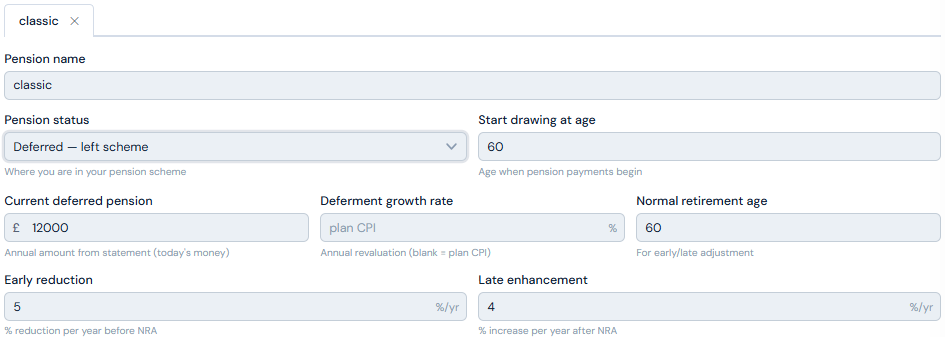
The inputs are broadly the same as for an active pension, with two differences: you don't need salary or accrual rate information because your pension has stopped growing, and you enter your current deferred pension value rather than a projected figure.
Current deferred pension
The annual income your pension will pay at NRA, taken from your statement. This figure is usually expressed in today's money — your statement should make clear whether that is the case.
Deferment growth rate
While your deferred pension sits waiting to be drawn, it is typically revalued each year to protect against inflation. Your statement will specify the revaluation rate — often CPI, sometimes a fixed percentage, sometimes capped CPI. If your scheme uses CPI, leave this field blank and the planner uses its plan-level inflation assumption. If your scheme specifies a different rate, enter it here.
Drawing start age and early/late factors
The same logic applies as for an active pension. Drawing at NRA means no adjustment. Earlier means a reduction, later means an enhancement — as described above. Setting your drawing start age to match your NRA ensures you receive the full unmodified pension income.
Post-retirement escalation and survivor pension
Identical to the active pension section. Enter your scheme's specific escalation rate if it differs from CPI, and your survivor pension percentage.
In payment — already drawing
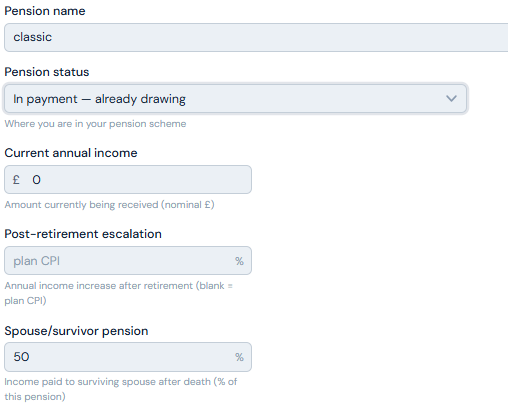
This is the simplest status. All the decisions have already been made — your income is set, any lump sums have been taken, and early or late retirement adjustments are already baked into what you receive.
Enter your current annual income from the scheme. The planner grows this each year in line with your post-retirement escalation rate and incorporates it into your income projection from now.
The survivor pension percentage can also be entered here for couple plans.
Lump sums
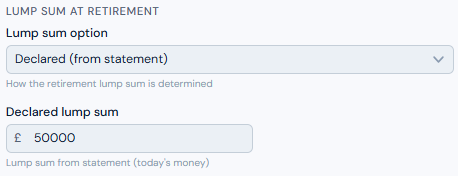
DB schemes often allow you to take a portion of your pension as a tax-free lump sum at retirement, in exchange for a permanently reduced income for life. This is called commutation. The lump sum panel appears for active and deferred pensions only — if you are already in payment, lump sums are considered to have been taken.
There are five options:
You take no lump sum. Your full pension income is paid from retirement.
Your statement specifies a lump sum that is automatically paid alongside your pension at retirement. This is common in older public sector schemes where a lump sum is built into the scheme design rather than being a discretionary choice. Enter the figure your statement gives you. Income is not reduced — the scheme has already accounted for it.
You choose a specific lump sum amount in today's money. The planner inflates it to drawing date, then calculates the corresponding reduction in your annual income using your scheme's commutation factor. The lump sum is capped at the HMRC maximum.
You take the largest lump sum the scheme allows, subject to your remaining Lump Sum Allowance — the lifetime limit on tax-free pension cash, currently £268,275 across all your pension arrangements. The planner calculates the maximum available based on your scheme's commutation factor and your remaining LSA.
You specify what percentage of your projected income to exchange for a lump sum at your scheme's commutation factor. For example, surrendering 25% of a £20,000 pension at a commutation factor of 15 produces a lump sum of £75,000 and a residual income of £15,000. Useful when your scheme quotes a commutation factor and you have a specific income target in mind.
The commutation factor (CF) is the number of pounds of lump sum you receive for every £1 per year of income you surrender. The default in the planner is 12, which is conservative — typical public sector schemes (NHS, LGPS, Teachers) use factors of 15 to 22. Always enter your scheme's actual CF. A higher factor means a significantly larger lump sum for the same income reduction.
The decision of whether to take a lump sum, and how much, is genuinely complex. A larger lump sum means a lower income for life. Whether that trade-off is worthwhile depends on your other assets, your income needs, your tax position, and how long you expect to live. It is one of the areas where professional advice can make a meaningful difference.
Multiple DB pensions
It is not unusual to have more than one DB pension — particularly if you have worked in the public sector across different employers or roles. Each pension should be entered separately. The Classic and Alpha civil service pensions are a common example: Classic will be deferred, Alpha active, each with its own NRA, accrual basis, and lump sum rules.
The planner applies each one independently and combines them correctly in the projection.
Lump sums across multiple pensions and the lifetime allowance
If you have more than one DB pension and both include lump sums, the combined total is subject to the £268,275 lifetime limit. The planner allocates your LSA in the order your pensions are listed.
This matters because if the combined lump sums exceed the allowance, any excess is taxable — and the tax rate applied to that excess depends on which pension's lump sum is allocated last and what your income level is at the time. In a scenario where two pensions have substantial lump sums, the order in which they are listed can make a real difference to the tax bill on any excess. This is another area where professional advice adds genuine value.
The pension listed first gets first claim on the £268,275 allowance. If your combined lump sums exceed the cap, consider which pension has the higher marginal tax rate on its income and list it first — this gives it the tax-free portion and pushes the taxable excess onto the pension whose income sits in a lower band. The planner's LSA Tracker shows how the order affects tax in a two-pension scenario.
What the planner does with it all
Once your DB pension details are complete, the planner treats this income as guaranteed — applied first against your monthly target before any flexible accounts are touched. It grows each year at your post-retirement escalation rate, adjusted for any early or late drawing factors, and is combined with state pension, annuities, and any work income to form the guaranteed income layer of your projection.
The result is a projection that reflects the real value of your DB pension — stable, inflation-protected, and independent of market performance — within the context of your complete retirement picture.
If you have a spouse or partner and you've entered survivor pension percentages, the planner will also model what happens to your partner's guaranteed income layer if you predecease them — and vice versa.
The planner does its best with what you give it, but DB schemes are complex and scheme-specific rules vary enormously. If your projection looks significantly different from what your scheme's own modelling tools suggest, cross-reference your statement carefully — particularly the basis on which the projected income figure is expressed, the early/late factors, and the lump sum commutation rate.
For a DB pension of significant value, the numbers are worth verifying with your scheme directly or with a financial adviser who can access the full scheme rules. This planner is a guide. It is not a substitute for your scheme's own calculations, and it is not financial advice.